I want to start this article by thanking the people who put their time and effort into keeping the WordPress admin working. It’s not easy, and I’m glad I’m not one of the people doing it.
But, let’s face it. WordPress’ admin is cluttered and complicated for many people. It’s a miracle that the folks who work on it have been able to keep it together all this time.
I have a roommate who uses WordPress to run his blog. However, I have a part-time job simply teaching him how to use it. And, it’s been three years since I first set him up. He’s not the brightest of fellows, but when I envision what WordPress should be like, I imagine WordPress.org featuring a picture of him with his testimonial — So easy, a hick from Alabama can use it!
Over the past few years, WordPress has taken on a lot of new features. However, the downside to adding new features is that you must squeeze them in alongside the existing features. The new features are nice, but the WordPress admin has put on a few pounds. It’s time to trim the fat.
The great thing about WordPress is that you can change something when you don’t like it. You can take steps to unclutter the edit post screen. You can build a custom color scheme to make your admin prettier. Or, you can build a full-blown admin theme.
Lately, there’s been a rising trend toward a simpler admin. Admin themes might just be one part of the equation to getting there.
Why admin themes?
Because they’re cool.
When developers create something new, it’s generally to solve a problem. Admin themes can solve the following.
- Give users more options for what their WordPress admins can look like. Wouldn’t it be awesome if theme developers were also releasing custom admin themes to go along with their regular themes?
- Improve the WordPress UI. With more options available, it will get more people involved in the core WordPress UI. It will also present ideas to the UI team that maybe they haven’t thought of.
With that in mind, let me introduce you to a new admin theme.
DevPress Dashboard
Over the past month or so, I’ve had a chance to talk with Tung Do about WordPress admin themes. I’ve also been a test dummy for the past week while he perfected an awesome plugin that reshaped everything about the WordPress admin.
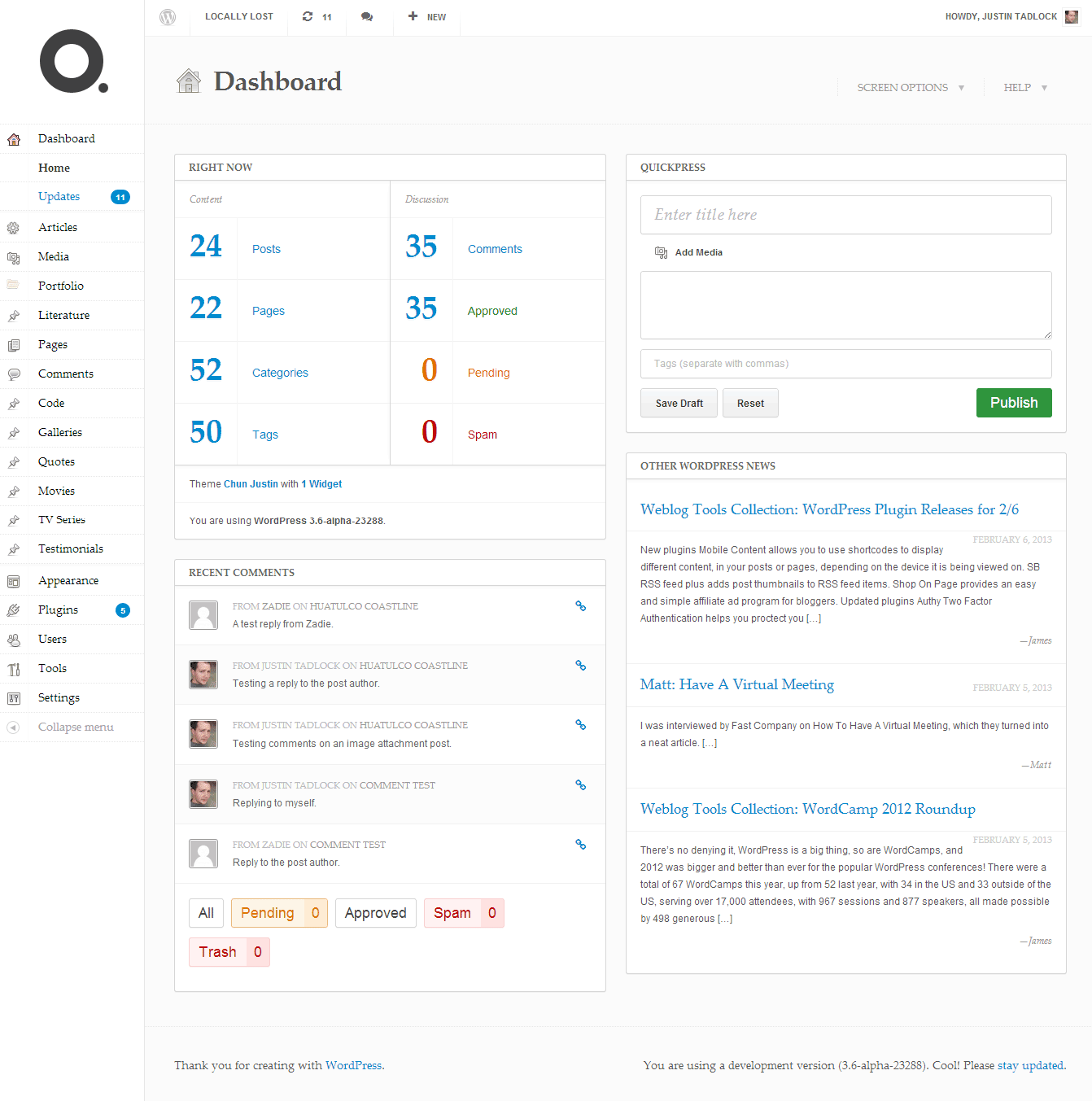
This is one of the most beautifully-designed admin themes I’ve seen in a long time. It makes the clutter of the admin seem much more freeing. I don’t know if it was just refreshing to see something new or if it’s just that damn nice, but I’m a fan.
The following is a screenshot of the “Dashboard” screen of the DevPress Dashboard plugin’s default design. You can view more screenshots on the plugin’s page.
The only thing I might see that could keep this plugin from gaining traction is that you must be a member of DevPress to access it. I’d much rather see a default plugin + theme combo for free with additional commercial designs. Even still, the plugin alone is worth the price of membership at DevPress.
Shameless self-promotion: DevPress themes are built off my Hybrid Core theme framework, so you’d be getting an awesome deal by joining the site.
Where does WordPress go from here?
For others to build beautiful admin themes, WordPress has a little shaping up to do.
First and foremost, inline styles halfway down the admin pages need to be moved into an external stylesheet where possible. It’s extremely tough trying to write custom CSS when you’re hitting roadblocks like inline styles.
Another thing we need as plugin developers is even easier ways to build stuff in the admin. The better tools we have to create things in a standardized fashion, the easier it is to style these things. The goal should be to standardize as much as possible.
Take a look at how easy it is to build theme customizer options. That’s straight up theme developer crack. I’ll take more of that, please.
Stop building custom-designed admin screens
Theme and plugin developers, please start using the tools available to you. I have yet to figure out what’s so hard about using the built-in Settings API. If you follow the rules, the rest of us can do some truly awesome stuff.
For theme developers, everything you need is there. I’ve never seen a theme settings screen that required anything more than what’s available via the Settings API. If it does, I’m 99.9% sure that you’re doing something you shouldn’t be doing in a theme. Besides, who wants to build theme options pages anymore now that we have the theme customizer?
For plugin developers, there are situations where you need more robust admin screens. Gravity Forms immediately comes to mind. However, for the vast majority, what you need is built in.
If you have a scenario that core doesn’t handle well, propose it on WordPress Trac. Submit a patch. Get involved.
More admin themes
I’d love to see more WordPress admin themes in the future, but it might be a brutal slugfest with non-standard plugins/themes and WordPress itself. Although, I believe WordPress core will eventually get there.
If you’re interested in developing admin themes, hop over to the Admin Themes repository on GitHub. It’s a little project I’m building to make it easy to build and use custom admin themes. It’s in the extremely early stages, so don’t expect much yet.
And, if you’re interested in getting involved in the WordPress UI, head over the the UI blog and see what you can do to help.

Great … finally I see someone who address the issue of those annoying “admin panels” and ” admin frameworks” for themes . The Settings API is really all what is needed !
This voice should be more loud across the net .
Here to echo Justin’s first statement. The WordPress UI team has a very difficult and thankless job. On top of that, the open source nature of WordPress isn’t a good platform for people to collaborate, design wise. Even when geniuses collaborate, the result is often less polished than the best of their individual efforts.
I read a lot of criticism concerning the admin area, but I honestly fail at understanding what’s difficult to use there… I’ve set up several blogs for non-techie average-smart people, and once I’ve explained them what to do and where to do it, they seem to be just autonomous. A couple of “here’s what’s difficult” example would help
If I were designing a “simpler layout” for beginners, one thing I would do is make QuickPress much more prominent, similar to how Tumblr is configured.
The average user wants to write a post and approve comments primarily, so all other options should be relegated to a separate area to avoid distraction.
Honestly, I’m sometimes amazed that people can figure out Facebook but not the WordPress admin.
I don’t really do client work, so the only people I teach how to use WordPress is friends or family. Some of them get it. Some of them don’t. When I refer to non-techie people, I truly mean it. Some of these people are only just figuring out that the Web is more than the handful of social networks they belong to.
I know you’ve been around WordPress for a while like me. Don’t you remember the good ol’ days when you basically had just a few possible buttons to click?
call it like you see it, eh?
I have no problem with introducing new looks to the admin – I’m not sure it’s too bad and I agree with @ozh that a few educational videos or even “looking over their shoulder” technique can do wonders.
Interesting thoughts and an area that hasn’t seen much traction from designers, but an interesting vertical to get into.
In my experience, one issue with changing the Admin area for clients is if that if it’s coupled with sending them to any kind of tutorial videos (like http://wp101.com), the confusion sets in fast.
Whether to include any customizations has to be decided on a case by case basis of course.
Case in point is that I use Ozh’s Admin Drop Down Menu plugin on several sites. That looks a lot different when a client decides to start watching WordPress tutorials on YouTube;)
“inline styles halfway down the admin pages need to be moved into an external stylesheet”
Thank you for stating that! I have only branded the admin area a few times and I recall what a nightmare it was. I actually don’t mind the default WP admin theme, though, any time I need “members” access to profiles, etc. I have them manage it all on the front end rather than allowing back-end access. I got tired of fighting constant changes in the admin structure.
To help my clients out I remove some things from the admin area to clean it up but the real help comes on the “front end” where I started adding more “edit” buttons to other things like widgets, slides in a slider, menus, copyright text, etc.
oh this panel wordpress which I like from image looks great but it is true and I agree with what you always say wordpress panel is very disorganized and especially for people who are just getting to know wordpress.
And thanks for the recommendation of the WordPress themes I have too intoaccount.
Greetings!
Not sure what you mean referring to admin + Gravity Forms combo as an option. GF, at least as of the 1.6-branch, cannot be used in admin screens. It is a front-end only tool. This is well documented in several gravityhelp forum threads.
If you were thinking “build your more complicated admin stuff in frontend” well that doesn’t seem much of a solution to me, but it’s the path I’m being forced to take for a customer. Fortunately it’s a just single “admin” screen I need to implement on the frontend.
Gravity Forms very much has admin screens. In fact, their Web site has a big ol’ screenshot of the admin on the front page.
Yes, Justin, of course GF has an awesome admin UI itself. But you cannot build a form with it that can be embedded INSIDE wp-admin. Only on front-end pages.
What you can build with Gravity Forms or what’s shown on the front end is outside the scope of this discussion.
OK I’m kinda lost now. Maybe I am completely misunderstanding “Gravity Forms immediately comes to mind” in the context you put it. Could you clarify what exactly you meant by this sentence before we wrap this up?
The explanation is in the sentence just before that:
With regards to theme options, how do you feel about the “Options Framework” by Devin Price?
http://wordpress.org/extend/plugins/options-framework/
I haven’t looked at the code for it. If it’s using the WordPress Settings API or the Theme Mods API and not building custom screens with non-standard elements, it’s fine in my book. That’s at least in terms of what this post is about.
Terribly sorry to go a little off subject — I did visit devpress to check this out. It seems the devpress blog has vaporized. Any word on what’s happening? There have been some substantial changed over at DevPress, since my last visit. Surely the blog shouldn’t be too much of a task to find(?)
Thanks!
I’m making drastic changes to DevPress. First is the blog, instead of small updates and theme release news, I’ll focus it on tutorials and editorials. Here’s the first article related to the DP Dashboard.
Thanks Tung,
I’ll keep checking back as you make updates. With that being said, did you delete previous posts?
Take care!
I recolored and renamed the admin UI to make WordPress easier to use for students in a robotics team. Many first-timers have minimal trouble getting around as they can now tell the difference between a “Post” (News) and “Page” and the boxes stand out better (not sure how that makes a difference):
http://cl.ly/Mn3f
I also added 6(!) admin themes: Bootstrap, Classic Grey, XXX Green, XXX Purple, Lite Green, Lite Purple. There are about 40+ editors working on the website and the freedom of design (or color here) is important:
http://cl.ly/H1qd
Of course, I think that WordPress still needs an overhaul for those who are new to the platform because I had to spend 3+ hours teaching everyone on how to use WordPress after letting the students play around with WordPress for an hour.
This is fantastic news.. I see it as the beginning of / potential for a standardised approach to the backend: WordPress is great in being so backwards compatible with themes, but the advice I’ve received regarding the backend is “Don’t mess – it will likely change radically next release”, “editing the dashboard is a maintenance ball and chain” (I just learnt the phrase technical debt).
Happy Tables is a great example of what can be achieved with the backend.. I’d love the admin space to be as vibrant as the front end..
Nice work Tung Do!
Ladies and gentlemen, Justin is right! I guess you can call me the hick from Alabama that uses it. Even though there are some things on Word Press I still don’t understand the admin is as easy as it comes.
DevPress is gorgeous!
When handing over the keys to a site to a client, I usually do a “simplicity pass” on the admin – hiding low importance items and sometimes outright un-registering menu items, meta boxes, or dashboard widgets that aren’t relevant for the site or client.
In most cases, this makes the admin much more simple and straightforward for the client (which they like) while dramatically reducing the likelihood of their accidentally breaking something (which we all like).
I’m huge fan of bootstrap and here is one of them well designed for wp. – https://github.com/aristath/bootstrap-admin
Ha ha. Thanks for this article. I just realized that I got the lifetime membership with Devpress that I bought long time ago. I already knew about this plugin when Tung Do released it (I think few months ago). So, time to download and install it
Funny enough just last week I had a client who didn’t want their site to look like WordPress at all. In looking for a solution (I knew there had to be one) I stumbled upon the idea of admin themes.
I think the idea is great and will work perfectly for this particular client, however I do share the same concern of Adam Warner (above) that if they know it is WordPress and start watching videos it could definitely cause confusion.
However, I do like the idea of the WPMUDEV’s “Easy Blogging” which enables the ability to turn on and off the simplified admin settings.
We use Wordpress themes all the time and I would love to see this or an increase of this (Wordpress admin themes). I cringe for your roommate if he ever read this blog post…I mean saying he’s not the brightest of guys.
Justin, have you tried the MP6 plugin? http://wordpress.org/extend/plugins/mp6/
Matt Mullenweg and several other important Core UI contributors are using the MP6 plugin to experiment with the WP-Admin UI. Their intent is to get more developers involved with testing their ideas as they try things, so they may arrive at a great long-term solution for opening up theming of the WP-Admin and add it to core.
I’ve been using it in conjunction with a custom plugin I created. It allows me to easily do things like add icons for my custom post types using an icon font. And it is simple for me to override some styling choices they make that I don’t like (i.e. they removed the .icon32 class of icon from the heading on all screens).